Feb 16, 2011

How to setup a school

If you have a background in education i.e. you are a teacher or if your family members are educators; and you are planning to put up a business, why not consider putting up a school? In our city, there’s a family who put up a kindergarten school (Pre School), which I guess, is the easiest for starters, and they eventually expanded and now included an elementary and high school with plans to include a collegiate level that offer degrees soon. I reckon an education business is profitable to many.

Your probability of success is superior because you will be drawing inspiration and technique from your own expertise, and also because it is something you will enjoy doing; therefore, you will be more likely to sustain the business than someone who is just in it for the money. Furthermore, schools are always in demand and the tax outlook is good.

Going into this business becomes more compelling if you have partners that can help you and provide you with school space or building and when there is a capital available.

So, how do we start setting up a school?

Basically, a school is an organized space for learning, approved and monitored by the relevant government agencies, and follows a curriculum and staffing pattern set by the Department of Education or Commission on Higher Education; depending on what level of education your school is offering.

1.Staffing

Pre school or Elementary and high schools— which should probably be your starting point, as it would be too complicated to venture into higher education right away—are staffed by a principal and teachers who must all be licensed educators (that is, board passers). This can include you or some of your family members if they are educators themselves.

The principal must have a Master’s degree in education. The following personnel are also mandatory: school administrator, administrative staff, head teacher, librarian, nurse, security guards, maintenance people, and cafeteria staff.

2. Build it up

Should you decide to open a school, it would be less-capital intensive if you first start with a preschool and then gradually expand to the grade levels at the rate of two or three grades per year.

Or, you could just stay at the preschool levels forever. It really all depends on your personal preference. For school space, you could either lease or purchase property in a safe neighborhood, or if you already have one of your own, just confirm that it is situated in a safe area and you’re good to go.

3. Requirements

You will need to obtain the following:

•Clearance from the Homeowners’ Association in the neighborhood where your school will be located.
•Barangay clearance from the barangay where the school will be situated.
•Registration with the Securities and Exchange Commission (SEC). To comply with SEC requirements, your school must have a board of trustees and officers such as president and vice president.
•Registration with the Bureau of Internal Revenue (BIR).
•Mayor’s permit from the local government unit where your school will be located. [See nine signs that you're ready for entrepreneurship here]
•Permit to operate from the Department of Education (DepEd).

4. Safety issues

A DepEd official will visit your school and inspect if it passes the requirements before issuing you a permit to operate. To obtain the permit, you will have to prove that your school is a safe structure built of strong materials; has fire escapes, a fire alarm, and fire extinguishers on every floor and in every room and corner; has good ventilation and spacious classrooms as well as clean toilets; has a playground or athletic field and a gym or auditorium hall; has a clinic, a library, a laboratory, a computer room, and a dining hall or cafeteria; and administration offices with a separate teachers’ lounge.

5. Year-round operation

For starters, you can offer scholarships, tuition discounts and other promotions of similar type to entice prospective students to enroll in your school. As you already know, you will have to operate your school year-round and even during the summer and vacation months of April and May, your staff will have to be paid and the school will have to remain open for summer classes.

Reference: Entrepreneur Philippines Magazine, June 2010
Feb 1, 2011

Why a point-of-sale (POS) terminal is important for your business?

A point-of-sale system, though not mandatory, is a great way to manage and monitor your inventory.

So you want to put up a business? One way to make things easier for any business is to put up a point-of-sale (POS) terminal, which is basically a computerized replacement for a cash register.

The POS, a system put in place by the Bureau of Internal Revenue (BIR), is not mandatory but is encouraged, says former BIR Commissioner Joel Tan-Torres in an interview with Entrepreneur Philippines.

“If you want to make your transactions transparent, the POS is necessary,” says Tan-Torres, adding that it is especially useful to record and track customer orders, process credit and debit cards and manage inventory.

The process for securing a POS is a bit tedious but it is necessary for business owners who cannot be in their place of business 24/7, Tan-Torres says.

A POS makes it easier for owners to monitor their operations without necessarily being in their establishments the whole time.

According to an information sheet provided by the BIR, the POS terminal has as its core a personal computer, which is provided with application-specific programs and devices for the particular environment it will serve.

There are different POS systems, depending on the business. “A POS system for a restaurant, for example, is likely to have all menu items stored in a database that can be queried for information in a number of ways. POS terminals are used in most industries that have a point of sale such as a service desk, including restaurants, lodging, entertainment, and museums,” guidelines from the BIR say.

Increasingly, POS terminals are also Web-enabled, which makes remote training, and operation possible, as well as inventory tracking across geographically dispersed locations.

So, if you are into retailing or other business, how does a point-of-sale (POS) terminal function? Wikipedia details it as:

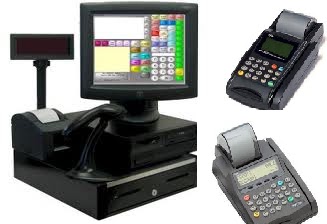
A Retail Point of Sales system typically includes a computer, monitor, cash drawer, receipt printer, customer display and a barcode scanner, and the majority of retail POS systems also include a debit/credit card reader. It can also include a weight scale, integrated credit card processing system, a signature capture device and a customer pin pad device. More and more POS monitors use touch-screen technology for ease of use and a computer is built in to the monitor chassis for what is referred to as an all-in-one unit. All-in-one POS units save valuable counter space for the retailer. The POS system software can typically handle a myriad of customer based functions such as sales, returns, exchanges, layaways, gift cards, gift registries, customer loyalty programs, BOGO (buy one get one), quantity discounts and much more. POS software can also allow for functions such as pre-planned promotional sales, manufacturer coupon validation, foreign currency handling and multiple payment types.

The POS unit handles the sales to the consumer but it is only one part of the entire POS system used in a retail business. “Back-office” computers typically handle other functions of the POS system such as inventory control, purchasing, receiving and transferring of products to and from other locations. Other typical functions of a POS system are to store sales information for reporting purposes, sales trends and cost/price/profit analysis. Customer information may be stored for receivables management, marketing purposes and specific buying analysis. Many retail POS systems include an accounting interface that “feeds” sales and cost of goods information to independent accounting applications.

So it is really wise to get a point-of-sale (POS) terminal for your business.


The first step in applying for a POS is to get in touch with the BIR Revenue District Office that has jurisdiction over your main business. Accomplish the so-called BIR Form 1907, or Application for Permit to Use Cash Register Machine/Point of Sale

If your business is already operational, be aware of its sales capacity and receipts you have issued before applying for a POS.

You must have a joint sworn declaration by the applicant (you) and the distributor or vendor of the POS machines stating the following:

• Name, address, business name/style of the applicant, taxpayer’s identification number (TIN) of the applicant, kind/line of business and the address where the POS machine shall be used;

• Name, business style, address and TIN of the distributor or vendor of the machine;

• For cash register machines: Brand, model, serial number and type of all its parts, whether electronic or mechanical, whether with resettable or non-resettable accumulating grand total, and whether new or second hand;

• For point-of-sales machines: Brand, model, serial numbers and type of all its parts, whether new or second hand, and software to be used;

• Maximum accumulating sales capacity;

• Reset counter number; and

• Other essential features of the POS
machine.


There are the other administrative requirements that the applicant must submit, the guidelines from the BIR further show.

1. These include a photocopy of proof of payment of registration fee; photocopy of the Certificate of Registration (COR) issued by BIR; photocopy of Certificate of Registration of business style or name issued by the Department of Trade and Industry for sole proprietorships and a copy of the Securities and Exchange Commission Registration in case of corporations.

2. The applicant must also submit sample receipts for “no-sale” transactions identified to come from the issuing machine legibly showing the necessary information on the company. These include company logo, business name, trade name, proprietor’s name if applicant is single proprietor, address where the machine is going to be used including branch identification and consecutive receipt numbers and date. The sample receipt must also show the reading of the accumulated grand total recorded in the machine, and in case of electronic and POS machines, the reset counter number.

3. For machines with resettable accumulating grand total, all the proprietor’s reset keys and or a copy of the software to be used in the actual operation of the POS machines and customizations made on the machine as well as operating manuals, must be submitted.

4. Applicants or business owners who want to put a POS in affiliated companies or sister companies, franchisees or branches must submit a photocopy of previously issued permits for mother or sister company or another branch using the same system.

5. Applicants who want to repair, upgrade or change their systems must also notify the BIR through a written letter to the revenue district office that issued the existing permit. After the repair, upgrade, change, modification or update, the taxpayer shall then submit a new BIR Form 1907 together with the required documents to the respective BIR district office. The same is true for the removal or withdrawal of machines.

Indeed, the process can be tedious but as Tan-Torres says, it is helpful for those who are serious in their business and want to conduct things in a transparent manner.

BUREAU OF INTERNAL REVENUE
www.bir.gov.ph
BIR National Office Bldg., BIR Road,
Diliman, Quezon City 1101
(02) 981-7000, (02) 981-8888

Source: By Cecilia Gonzalez, from Entrepreneur Philippines Magazine